Your job is to write your own version of malloc(). C is, for the most part, a statically typed language which means that all data structures have a fixed size at compile time. If you want to make a data structure (e.g. an array) the size of which is only known when the program executes, you need to use the C utility malloc().
In this lab, you will write your own dynamic memory allocator called MyMalloc() that you should be able to use in place of the standard malloc() utility. The API for MyMalloc() is given in the header file my_malloc.h which is shown below.
#if !defined(MY_MALLOC_H)
#define MY_MALLOC_H

#define MAX_MALLOC_SIZE (1024*1024*16)

void InitMyMalloc();
void *MyMalloc(int size);
void MyFree(void *buffer);

void PrintMyMallocFreeList();		/* optional for debugging */


#endif
You must use this header file in your solution. If you do not, your solution, however functional, is incorrect. Part of the assignment is to demonstrate that you know how to program to an existing API, which is a skill that is essential to an operating systems project.
You MUST also put your source code in a single file with the name my_malloc.c so that the autograding software will be able to correctly find and build your wonderful solution.
#include < unistd.h >
#include < stdlib.h >
#include < stdio.h >

#include "my_malloc.h"

int main(int argc, char *argv[])
{
	char *array;
	int i;

	/*
	 * must be first call in the program
	 */
	InitMyMalloc();

	array = MyMalloc(10);
	if(array == NULL)
	{
		fprintf(stderr,"call to MyMalloc() failed\n");
		fflush(stderr);
		exit(1);
	}

	for(i=0; i < 9; i++)
	{
		array[i] = 'a' + i;
	}
	array[9] = 0;

	printf("here is my nifty new string: %s\n",array);

	MyFree(array);

	return(0);
}
Look at this code carefully. The first executable code in the program
main() is a call to InitMyMalloc(). Your solution should use
the call to InitMyMalloc() to initialize any global data structures you
will need.
The call to MyMalloc() works the same way that the standard malloc does: it takes one integer argument which is a size, and returns a pointer to a contiguous region of that many bytes. Thus, the call MyMalloc(10) returns a pointer (as a void *) to 10 contiguous bytes of memory that the code has allocated.
As a quick check of your C skills, make sure you understand what the code shown above does. What does the loop do? Why is array[9] treated differently?
The call to MyFree() is analogous to a call to the standard free() routine. It takes a single argument which is assumed to be a pointer that was returned by a previous call to MyMalloc(). MyFree() is a void function.
unsigned char BigBuffer[MAX_MALLOC_SIZE];creates an array of MAX_MALLOC_SIZE bytes. All of the space you allocate with MyMalloc() should come from this array.
The next thing to understand is that your code will need to keep track of any space it gives away. This record keeping is necessary for two reasons. The first is that you will need to keep track of free and allocated memory so that you don't allocate the same region of memory to two different MyMalloc(). The second reason is that as space is given away and then returned to your code (via MyFree(), your buffer will become "fragmented" as parts of it remain allocated and have yet to be freed. We will study memory fragmentation later in this class more completely, but to get an idea of what it means, consider the following simple example.
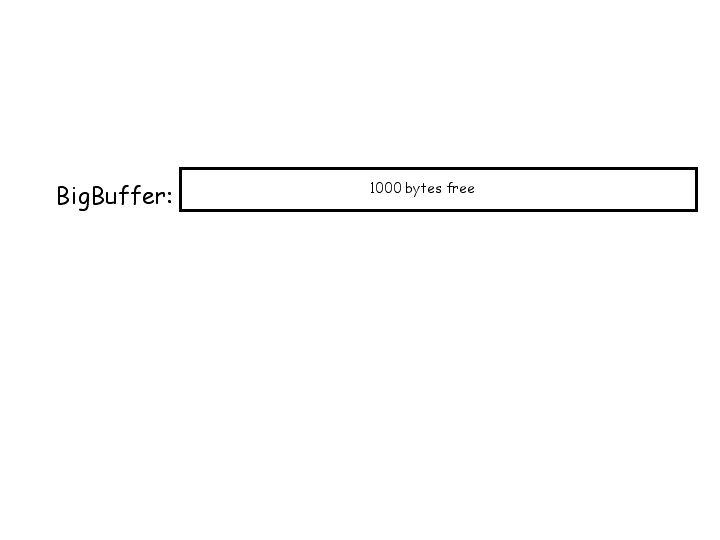
Assume that MAX_MALLOC_SIZE is 1000. Your array, then, is large enough to allocate a maximum of 1000 bytes, and no more. Initially, all 1000 bytes are free.
Now, let's go through a set of examples using the code in simpletest2.c. For this example, assume that MAX_MALLOC_SIZE has been set to 1000 in my_malloc.h. Now, let's consider what happens when the call MyMalloc(128) gets made. You will need to allocate the first 128 bytes and return a pointer to the first by to the caller. Thus
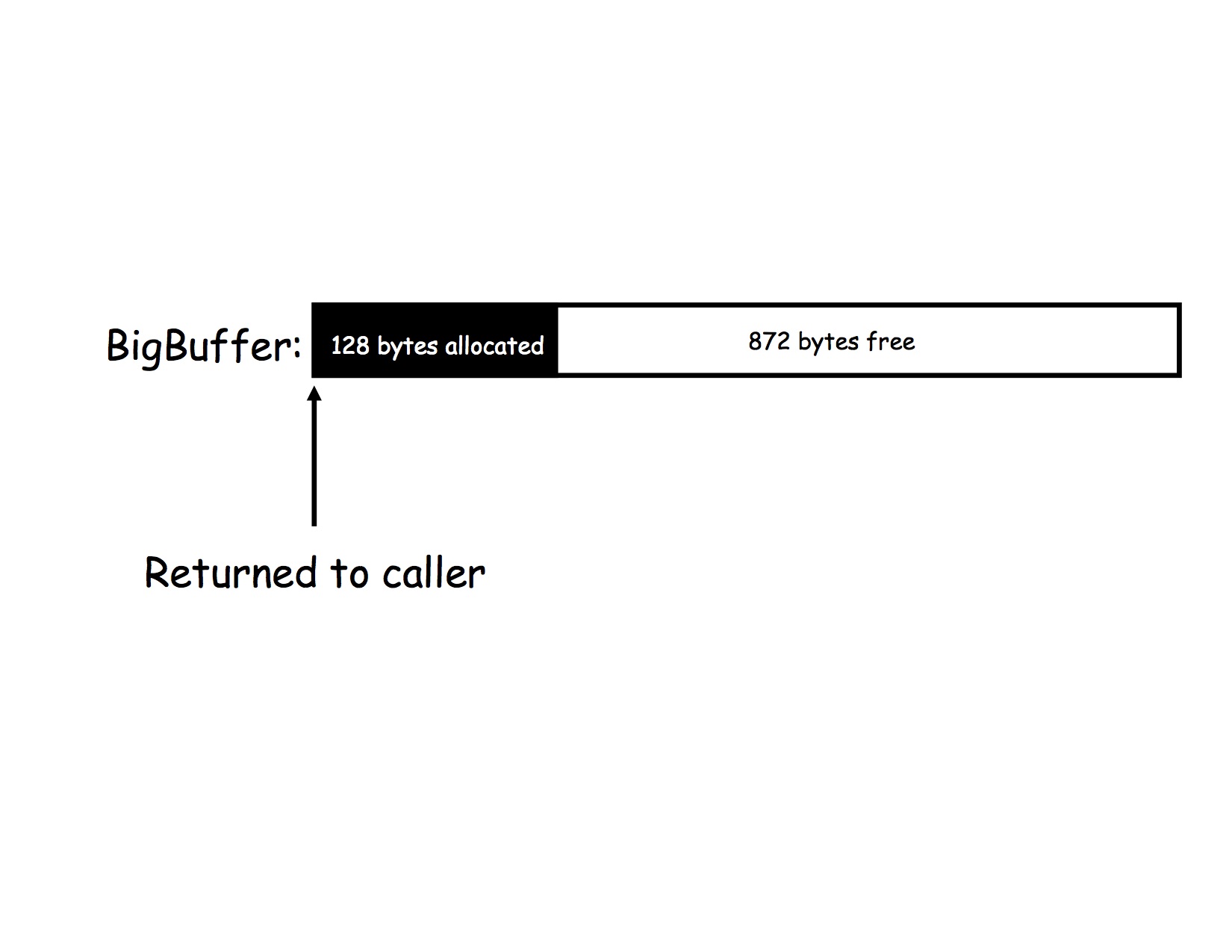
In what follows, we'll color allocated space black to show that it is allocated and leave free space white.
Let's now say that MyMalloc(32) is called. You cannot use the first 128 bytes since they have been already allocated and have not yet been freed by MyFree(). That would violate the semantics of malloc which says that the memory will be allocated uniquely until it is freed. How do you know where the next 32 bytes should be allocated? You'd probably like to use the 32 bytes right after the 128 you allocated last time, but how are you going to find this location?
The answer is that you need to maintain a data structure that keeps track of what space is allocated and what space is free. The tricky part is figuring out where to keep the data structure. If you are implementing malloc() you can't call malloc() (or else, why would you implement it?). Instead, what you do is to define a C record that, more or less, contains the following information.
struct malloc_stc
{
        struct malloc_stc *next;
        struct malloc_stc *prev;
        int size;
        unsigned char *buffer;
};
The next and prev pointers allow this record to be maintained on
a doubly linked list (we'll see why in a minute). The size indicates the size
of the block, and the buffer points to the beginning address of the block.
Now, here comes the tricky part. You "stamp" this data structure into your array, using up a little of its space for book-keeping. Typically, you put the space right in front of the block you've allocated. So for the previous example, your data structure would look like
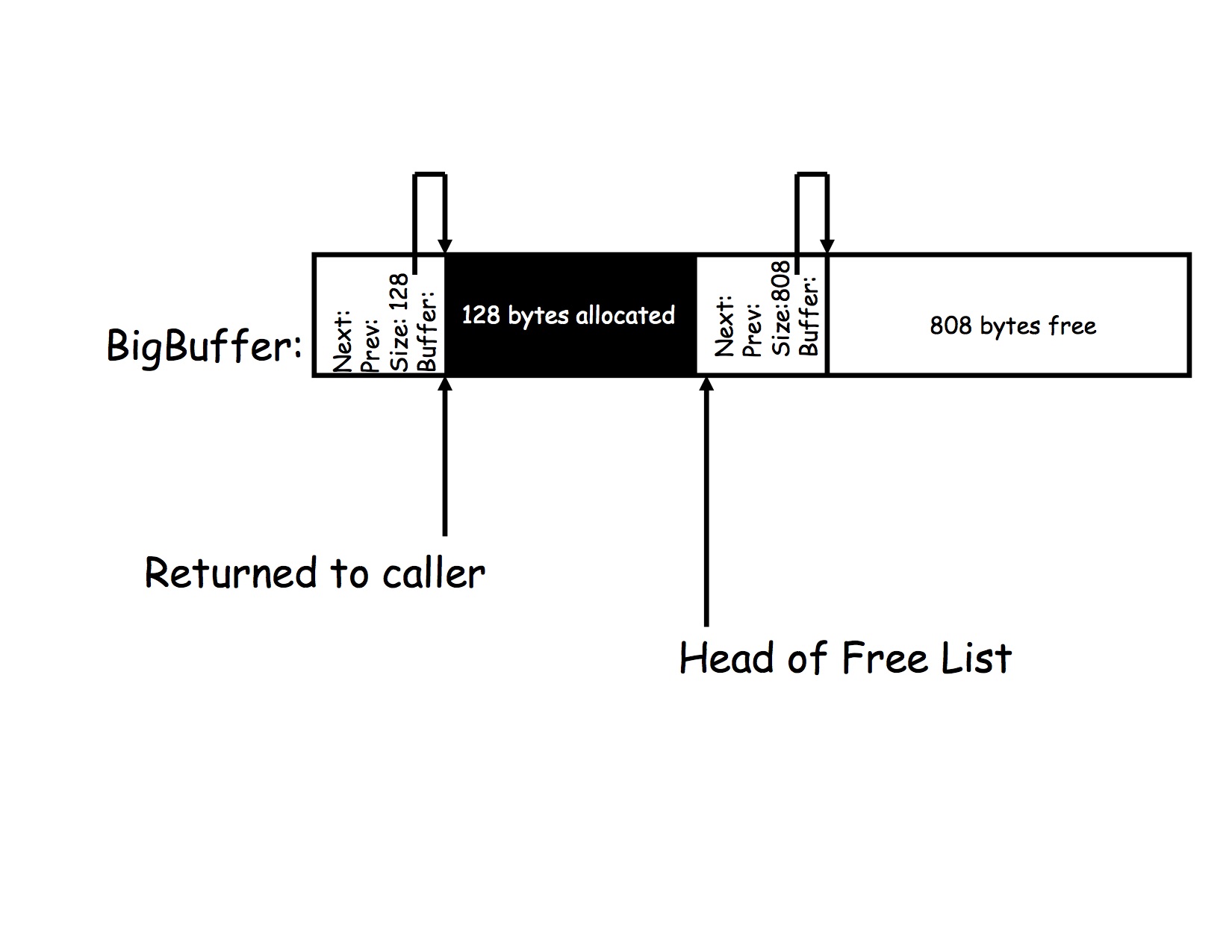
after the call to MyMalloc(128). Take note of a couple of features from this picture. First, notice that 808 bytes (and not 872 bytes) are left free. Why? Because the data structure you are using to keep track of the space is 32 bytes long (on the systems we will use this quarter). In this example, you lose 64 bytes to bookkeeping overhead (32 bytes for each bookkeeping record). That space comes out of your free space since you must return 128 bytes according to the semantics of malloc. There will be one bookkeeping record for each allocated block and one bookkeeping record for each free block in your malloc() space.
Now, let's go through the allocation process. To keep track of where in your array you can assign this chunk, you keep a free list and link in all of the free blocks. The head of the free list is a global variable. When you start out, there should be one block on the free list. It is the job of InitMyMalloc() to set up the initial free list. After a call to InitMalloc() the configuration should be thus:
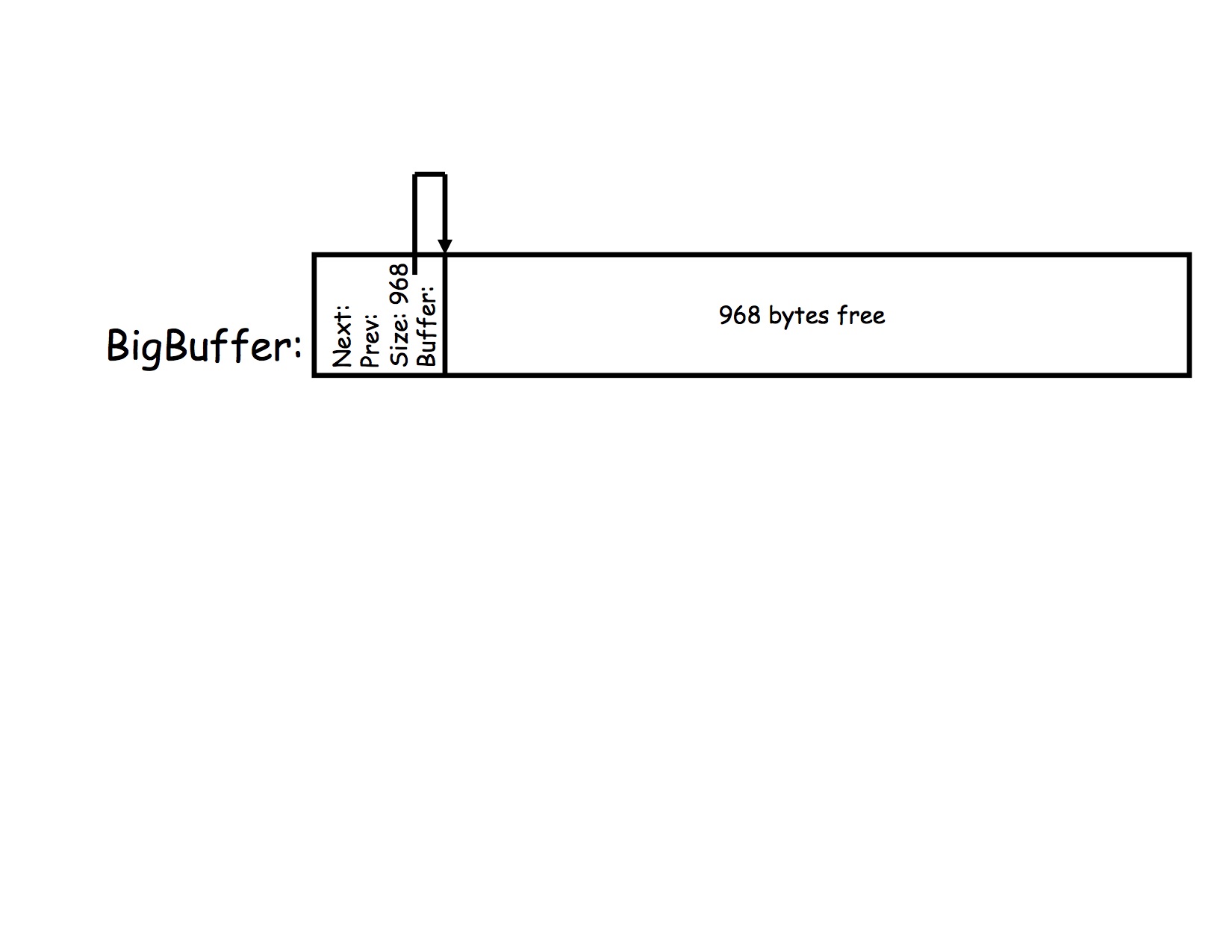
The second block in your split is becomes the remaining free space. You must create a new book-keeping record at the very front of this free space that indicate its starting location and size. Your free list head-pointer should be updated to point to the new free block. The result of splitting the initial free block into a 128 byte allocated chunk and a 808 byte free chunk is what is shown in the figure before this last one.
To keep the diagrams readable, we will only show the next pointers on the free list. The list should be a doubly linked list (with which you must be familiar). The prev pointers are back pointers in the opposite direction of the next pointers and they do need to be set. Showing them in the rest of the pictures, however, makes the diagrams too complex.
Continuing the example, consider what happens when MyMalloc(32) is called next. The 808-byte free block at the head of the free list must be split into a 32 byte allocated chunk and 744-byte free chunk which is at the head of the list (as shown below).
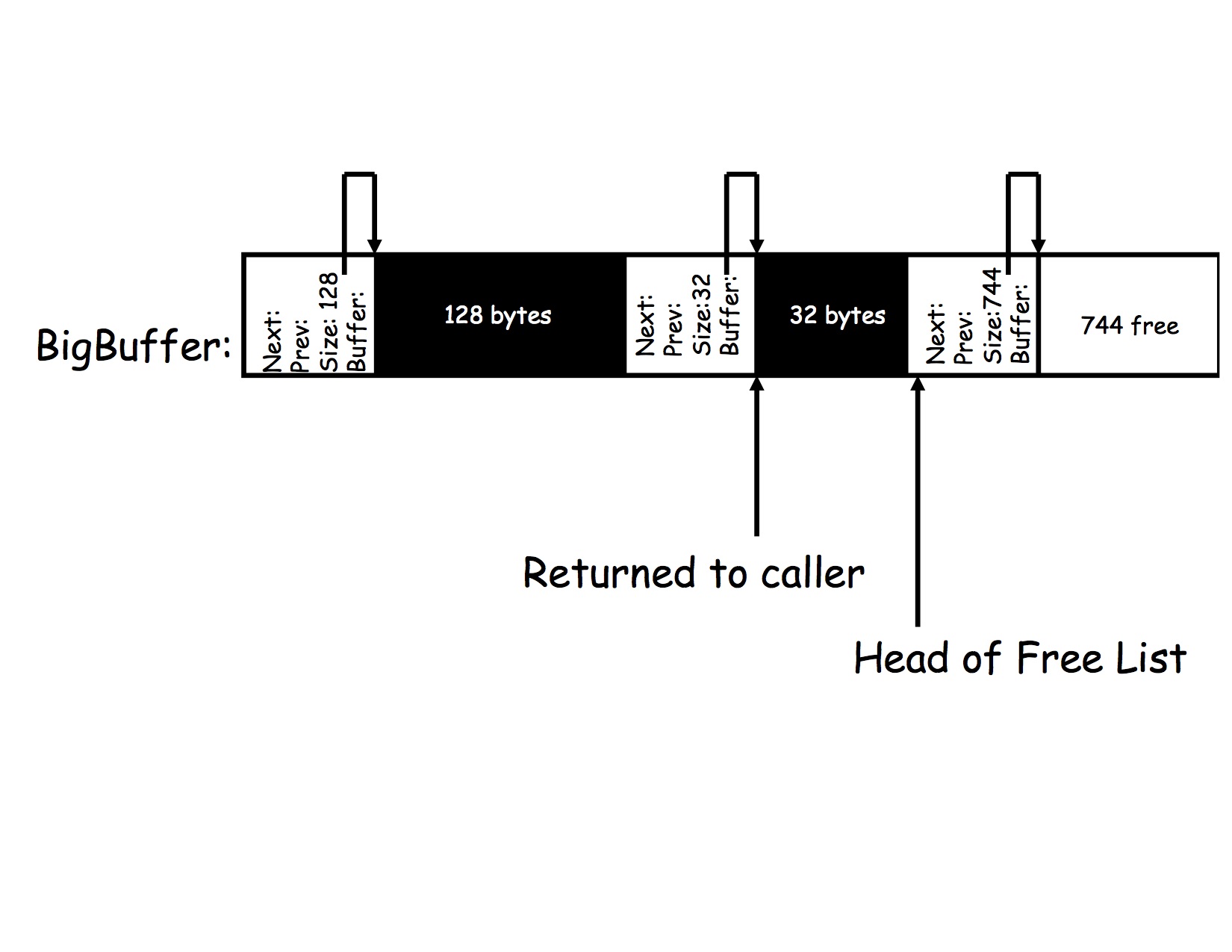
The free list head point must be moved to point to the new free block so that your code knows where to get new space if another call to MyMalloc() occurs.
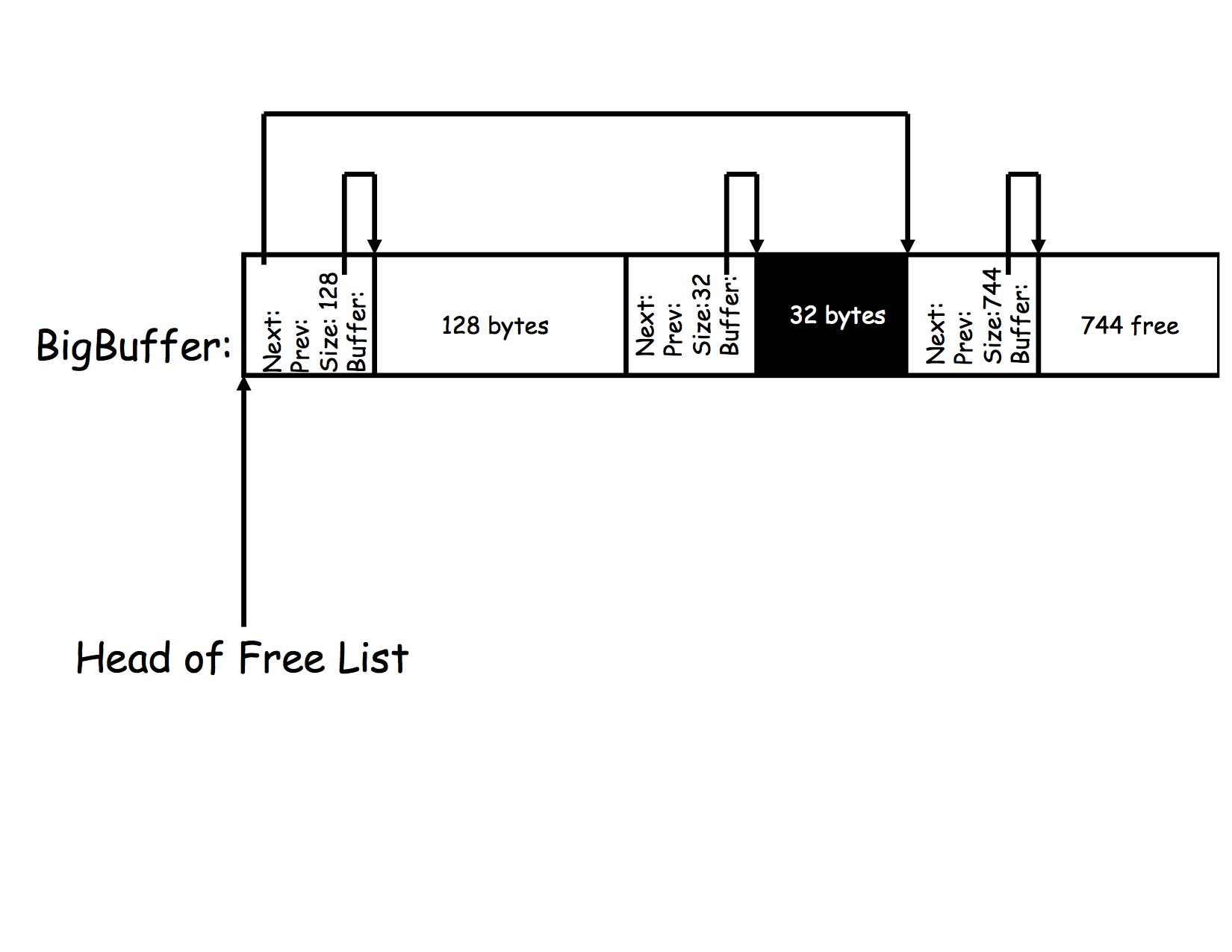
The head pointer points to the 128-byte block and its next pointer points to the 744-byte free block at the end of the buffer. It is best if you maintain the free list as a doubly-linked list so prev pointer for the end free block points back to the first block as well.
Notice that the allocated space of 32 bytes is in between the 128-byte free block at the front of the list and the 744-byte block and the end of the free list. At this stage, a call to MyMalloc(745) should fail and return NULL. Why? Because there is not a free block on your free list to permit you to allocate the space contiguously. The total free space in your list is 128 + 744 = 872 bytes, but the biggest block you can allocate is only 744 bytes long. This problem is called fragmentation and we will study it later in the course. For now, you should realize that this is, in fact, a problem that the "real" malloc() has as well.
Also notice that the 128-byte block comes before the 744-byte block on the list. You could have linked it in at the end, but it would make coalescing free space more difficult. When you implement MyFree() you will want to ensure that your free list contains the free blocks in sorted order. That is free blocks with lower addresses occur before free blocks with higher addresses on the list.
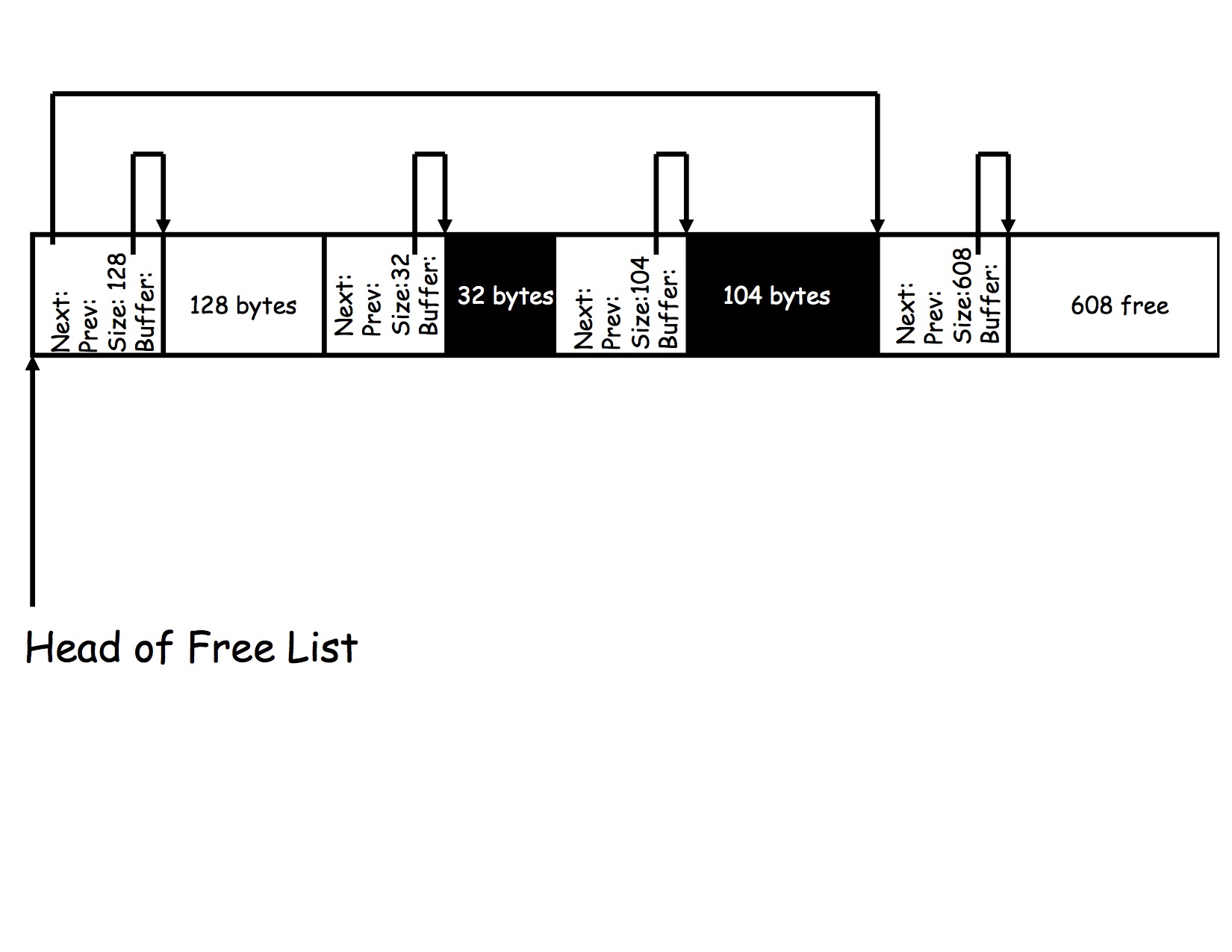
Your free list still only contains two free blocks, but the second is smaller by 136 bytes (32 bytes for the new book-keeping record and 104 bytes for the space).
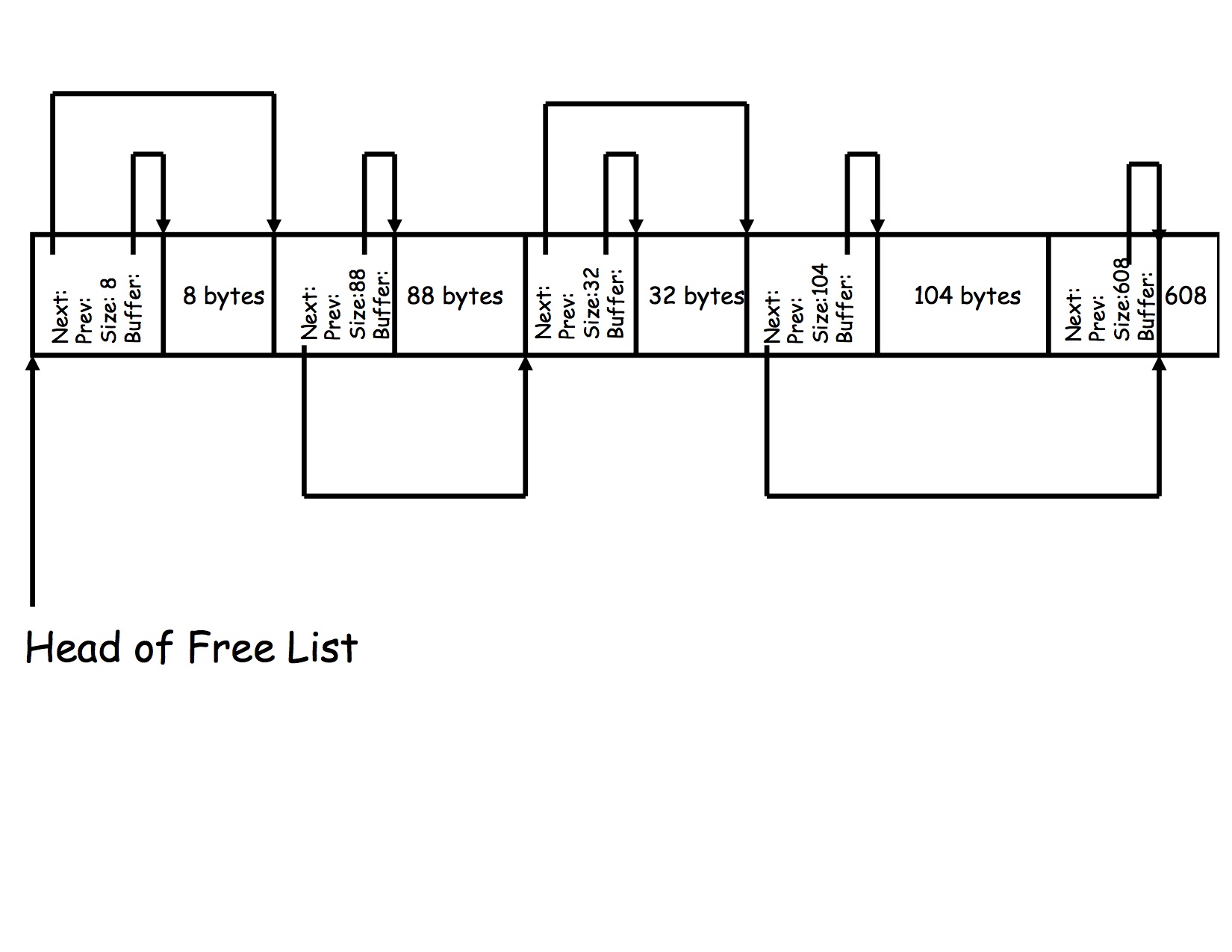
If, at this point, a call to MyMalloc(8) is called, where do you get the space? In this example, there are two choices: either you split the 128-byte free block or the 608-byte free block since either is big enough to accommodate an allocation of 8 bytes and the book-keeping record.
It turns out that a great deal of research has gone into trying to determine which choice to make. Strange, isn't it? We'll cover the issues in class, but in this assignment, you should implement what is called first-fit by starting at the head of your free list and walking down the list until you find the first block that is big enough to hold your request.
In the previous example, 104 bytes wouldn't fit in the first block so you had to move down the list. Now, however, a 8-byte block will fit in your first block so you split that block (and not the 608-byte block at the end). Here is the picture of what your data structures should look like after the call to MyMalloc(8).
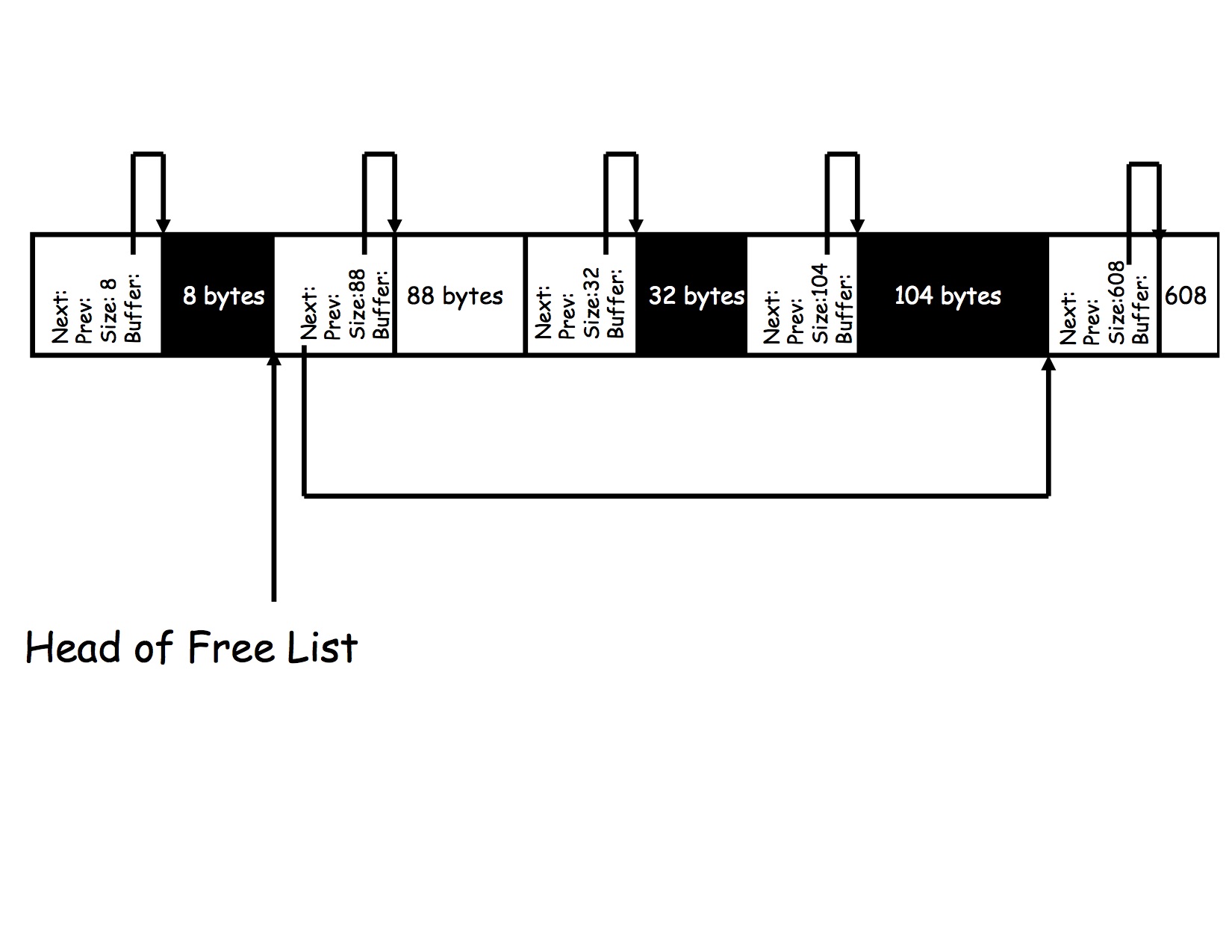
Notice that there are two blocks on the free list and how the 128 byte block has been split. Why is the remaining free space from that block 88 bytes? What is the largest allocation that could come from that free block of 88 bytes using first fit? By this point, you should understand completely why the data structures look the way they do. If you do not, go back and re-read the lab up to this point before moving on to the next section. If you still don't understand, read it again. It is VERY important that you understand how the data structures work and how they got to this state in order to successfully complete this lab.
You can see this requirement by taking a close look at the book-keeping data structure
struct malloc_stc
{
        struct malloc_stc *next;
        struct malloc_stc *prev;
        int size;
        unsigned char *buffer;
};
Why is the size of this data structure 32 bytes? First, on the current x86,
pointers are 8-bytes in size. Integers, however, are only 4-bytes. Thus, if
you add up the sizes in this struct you should get 28 bytes and not 32
bytes. The reason it is 32 bytes (you can verify this in your code by
printing sizeof(struct malloc_stc) is because the compiler
wants the pointer unsigned char *buffer to start on a memory address
evenly divisible by 8.
When this structure is allocated either as a global variable or as a local variable on a function's stack, the compiler wll ensure that the starting address is divisible by 8. Thus the first two pointers struct malloc_stc *next and struct malloc_stc *prev which will be put into consecutive memory locations, will both have memory addresses divisible by 8. Notice that the integer int size must have a memory address divisible by 4. Because it occurs right after a pointer in the structure, it will have a memory address divisible by 8, which is also divible by 4 so there is no alignment problems.
However, to make sure that unsigned char *buffer has a memory address divisible by 8, the compiler puts in padding (wasted space) of 4 bytes between int size and unsigned char *buffer. Thus, int size is really given 8 bytes of space but, because it is an integer, the CPU will only use 4 of them (the other 4 are wasted). As a result, however, the size of this data structure is 32 bytes (where 4 bytes are padding inserted by the compiler).
What does this have to do with you and malloc()? As you are hopefully coming to understand, malloc() is a function that allocates space at run time -- not compile time. Thus the compiler can't be assured that the memory associated with the structure will start on an 8-byte memory boundary the way it can when it is a local or global variable.
This issue places two subtle requirements on your solutions for this lab. The first is that your book-keeping structure will always need to start on an 8-byte boundary. You can assume that the compiler will make the global variable that you use as your malloc() space 8-byte aligned. That is, "BigBuffer" in the first figure of this write-up is 8-byte aligned.
A second more subtle requirement is that your implementation of malloc() only return space that starts on an 8-byte boundary. Why? Because if malloc() doesn't do that, every C program would need to align its data structures explicitly when using malloc(). The original version of C did not have this requirement and it turns out to be a real difficulty if it is added. Thus, the modern version of malloc(), and your implementation of MyMalloc(), must return pointers to memory that is 8-byte aligned.
This requirement, while difficult to explain, is easy to implement. You simply need to round each request to MyMalloc() up to the nearest multiple of 8 (assuming your bookkeeping structure is a multiple of 8 bytes as it is in my example). So if a program calls MyMalloc(6) you round 6 up to 8 and allocate 8 bytes (the extra 2 bytes are wasted padding).
We'll encounter alignment issues in the upcoming labs so now is a good time to understand what they are and how they come about even if you can make your lab solution for this lab "work" by simply rounding up. Trust me.
Doing so requires you to walk down the free list and "find" where a particular block goes when it is freed. Obviously, you cannot count on a user program to free your blocks in order. It is the code in MyFree() that has to take care of this detail. And here's why.
Notice that after all of the space is freed, your free space is still broken up into fixed-sized chunks. Before, there was an allocated block between the two free blocks which caused the fragmentation of the free space Now, however, the boundaries between blocks do not delineate free and allocated blocks. As such, there is no reason to keep the blocks subdivided -- the should be coalesced. That is, your code, as it is exiting the routine MyFree() should find free blocks that are adjacet to each other and merge them back into bigger free blocks. By keeping the list in sorted order, you can do this merging (called coalescing) in one pass of the list.
For example, if your coalescing function were to start at the beginning of this free list and walk down, it could look at each block and the block before it. If the end of one free block is exactly against the book-keeping record of another free block, the blocks can be merged.
Merging two blocks is simple. You choose one block to absorb the other. If your list is sorted smallest address to biggest (as in this example) choosing the block occuring earlier in the list is a better choice. If you do, then the procedure is to add the space of the second block and its book-keeping record to the space in the first block. Now the blocks are "one" (don't worry about re-initializing the book-keeping record you lost to all zeros -- malloc() doesn't specify what the contents will be of the allocated memory). The only thing left to do now is to unlink the second block (the one you have removed) from the free list since its space has been absorbed into the first block. Notice that by choosing the first block as the absorber, you can now consider your new list without starting over at the beginning. That is, you can look at your new big block and the block that comes after it on your new free list to see if you can do any further merging. If you can't, you move on down the list.
Here is a picture of what your list should look like after the first two blocks have been merged.
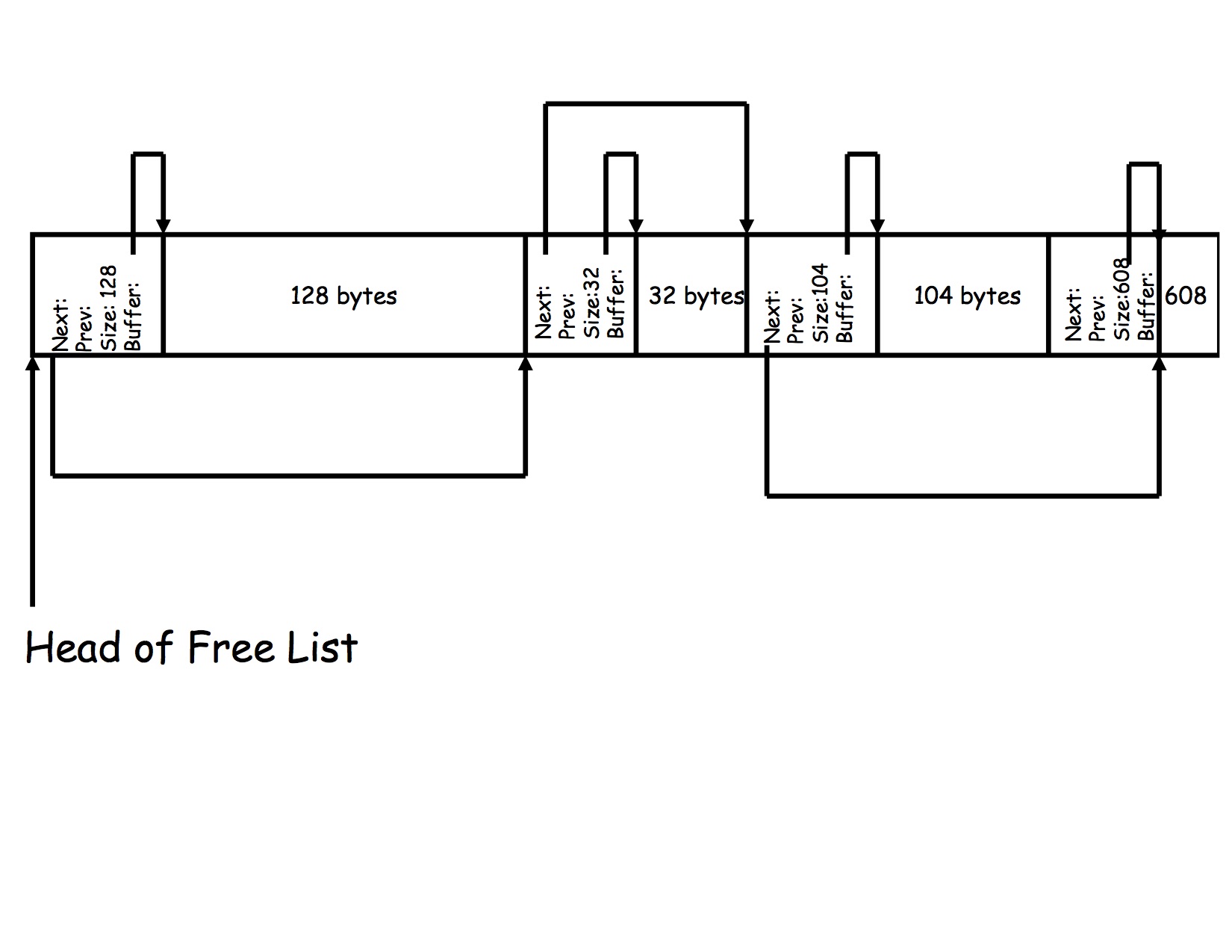
Your code should be able to repeat this process until no more merges are possible. If you have done it correctly, at the end, you will be left with one big free block at the head of your list.
The last question concerns when to call coalesce. You really have two options, either one of which is fine. The first option is to call it whenever MyFree() is about to exit. If you do, your code will coalesce at most 3 blocks. Why? Think about it a minute and you'll see that MyFree() only frees one block. If that block is between two free blocks, then you'll do two merges (one with the block in front, and one that merges the result with the free block behind). This is the solution I chose because it is much easier to debug (you only have to examine three blocks in the worst case). The other option is to wait until a call to MyMalloc() fails because there is no space. In this version, you would walk down the list looking for the first block that will fit. If you don't find one, you call coalesce to try to coalesce all of the blocks that you can, and then you re-walk down the list hoping that you've merged things together enough to satisfy the request. If this pass fails, you must return NULL.
If you read the description of splitting carefully you'll see that what you would normally do is to write a new record for the remaining free space in just after the 120th byte, but that record is 32 bytes long. The left-over space is only 8 bytes, so your 32 byte record would "spill over" into the next block.
You have two options here that yield a correct result. One is to "hijack" the 128-byte free block. Because the user doesn't know (can't see) your book-keeping records, if you hand out a block that is bigger than requested, the user will be none-the-wiser. Thus you could simply return the pointer to the 128-byte block and understand that the user is only going to use 120 bytes (because she doesn't know there are extra bytes).
The problem with this approach is that it can be quite wasteful if your book-keeping records are large. In my code, they are 32 bytes which means (in addition to padding) I might waste as much as 32 bytes of space by choosing the first request that fits and hijacking the larger record. I implemented hijacking in this way in my solution since 32 bytes (max) is a small amount to waste.
The second option is to make two passes. In the first pass you look for the best fit where you can implement the split (i.e. the requested space and the book-keeping record fit into the free block). If this pass fails, then you make a second pass looking for a block to hijack. The example figures in this write up assume a two-pass approach (even though my implementation uses the alternative). Thus the 104-byte block does not hijack the 128-byte block, but instead splits the larger block at the end of the free list.
In this assignment you free to implement either. However, notice that you can only use hijacking when the request fits, but the book-keeping record puts you over the available space. You CANNOT simply hijack the first block where the request fits. If you don't see why, ask yourself what would happen if, at the beginning, when the first call to MyMalloc() is made, you hijacked the first free block you find.
block: 0x1057ec060
	size: 4194304
	next: 0x1063ec0c0
	prev: 0x0
	buffer: 0x1057ec080
block: 0x1063ec0c0
	size: 4194176
	next: 0x0
	prev: 0x1057ec060
	buffer: 0x1063ec0e0
In this example, the first block is the head of the free list (the prev pointer is NULL). Notice that the next pointer contains the same address as the address of the second block which is the also the tail of the free list (the next pointer is NULL).
These functions should all be contained in a single file called my_malloc.c so that the autograding software supplied by UCSB can compile your code as a separately loadable module (i.e. a C ".o" file). The file that contains the code for these routines cannot contain a definition for the function main(). We will be linking the ".o" object file produced by your my_malloc.c (when it is compiled) with test routines that include a defintion of the function main(). If these terms are unfamiliar to you, please review the C lecture notes or a C tutorial with respect to using make and separately compiled object files.
You may implement the code any way you like. In particular, you may either coalesce when you run out of space or when MyFree() is terminating. It must behave in the same way as malloc() does, however, with the exception that main() will be allowed to call InitMyMalloc() before any calls to MyMalloc() or MyFree().
The TAs will be testing your code by compiling it with their own test codes. They will use this version of my_malloc.h so it is VERY important that you do not change this header file in any way. If your code depends on a change to this header file and won't work otherwise, it will fail when the TAs grade your assignment.